
Typography Animation and Kinetic Typography: How Per-Character Text Animation Transforms Brand Storytelling
There is a moment every designer recognizes — the moment a headline stops being words on a screen and starts feeling like something happening. Like a voice. Like a presence. Like the difference between reading a quote and hearing it spoken by the person who said it.
That moment almost always involves typography animation. Specifically, it involves kinetic typography — text that moves with purpose and expression rather than simply appearing.
This post is a deep dive into what typography animation actually is, how kinetic typography works at the mechanical level, and what becomes possible when you push past simple whole-layer animations into the expressive territory of per-character motion design.
What Is Typography Animation?
Typography animation — also called kinetic typography — is the art of animating text to express meaning, emotion, and rhythm that static letterforms cannot convey. It is not simply making text move. It is using the specific qualities of movement — timing, direction, acceleration, sequence, visual weight — as expressive tools that work in concert with the words themselves.
The term "kinetic typography" dates to film title sequences of the 1960s (Saul Bass is often cited as a pioneer), but the discipline has been transformed by digital tools. Today typography animation spans social media content, brand identity systems, app interfaces, presentation design, digital out-of-home advertising, and generative art.
What distinguishes kinetic typography from simpler text animation is granularity. Typography animation at the professional level animates at the level of individual characters or words, with each unit moving independently according to a choreographed timing system. The text does not just enter — it performs.
Typography Animation vs. Basic Text Animation: What's the Difference?
Basic text animation treats a block of text as a single unit — the whole thing fades in, slides in, or bounces in together. Typography animation goes further: it animates at the level of individual characters, words, or lines, giving each unit its own timing, path, and motion character.
The result is not just more visually complex — it is qualitatively different. When each character has its own moment, the text has rhythm. It has voice. It communicates before the words are even read.
Why Per-Character Animation Is a Fundamentally Different Thing
Most designers' first experience with text animation is whole-layer: the entire block of text slides in, fades in, or bounces in together. This works. But it leaves an enormous portion of the expressive range on the table.
When you animate at the character level, each glyph becomes an independent actor. The way they enter the scene — which ones arrive first, how fast each moves, the arc they follow, the easing that shapes each individual motion — creates patterns that carry meaning even before the words are read.
A headline where characters bounce in from below in left-to-right sequence creates a feeling of building momentum, of accumulation, of energy gathering toward the final word. The same headline revealed radially from the center — each character expanding outward from a focal point — creates a feeling of explosion, of radiance, of something emanating from its own core. The same words. The same letters. Completely different emotional signatures.
This is the core insight of kinetic typography: the motion is not separate from the meaning. The motion is part of the meaning.
The Architecture Behind Per-Character Animation
Understanding how per-character animation works mechanically helps designers make more intentional choices. Here is the underlying structure.
Animation Units
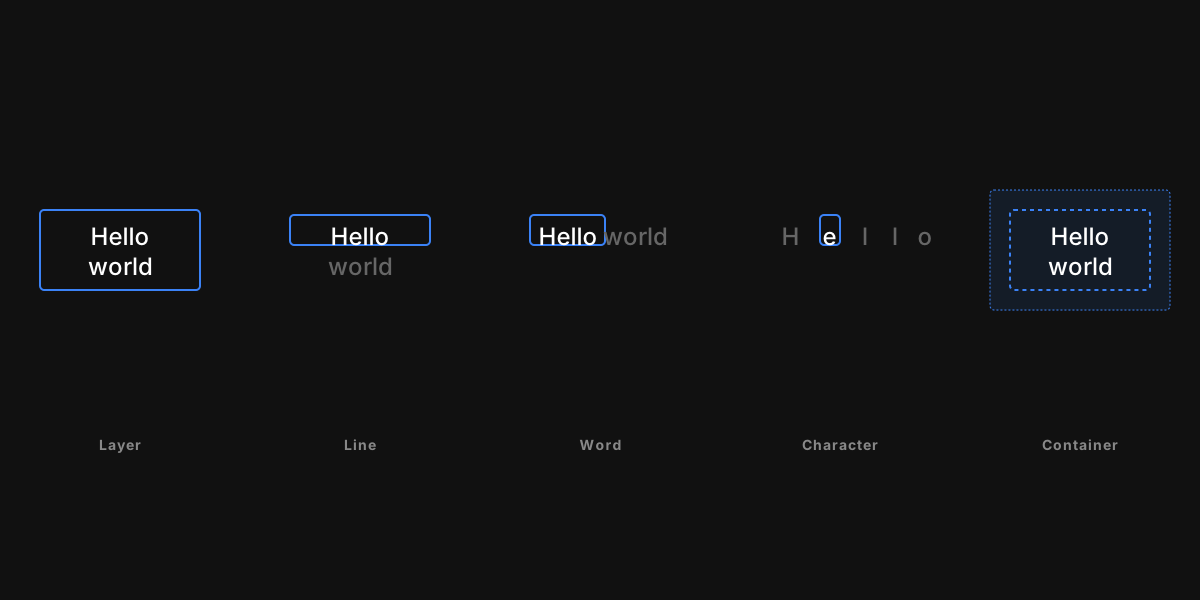
Every animation system has to decide: what is the smallest thing that moves independently? In a whole-layer system, the answer is the layer — everything together. In a kinetic typography system, the answer can be as small as a single glyph.
Vertex.art's animation engine supports five unit types:
- Whole layer — the entire text block as one unit
- Characters — each individual glyph
- Words — each word as a unit
- Lines — each line of a multi-line text block
- Container members — each child element within a group or frame
Choosing characters gives you the finest control and the most expressive range. Choosing words creates a less frenetic effect that reads more naturally for longer copy. Choosing lines works well for multi-line statements where each thought has its own entrance.
The Stagger Selector: Distributing Time Across Units
Once you have individual units, you need a system for assigning each unit its own moment in time. This is the stagger selector — the component that transforms a single global progress value (0 to 1 across the animation duration) into per-unit timing offsets.
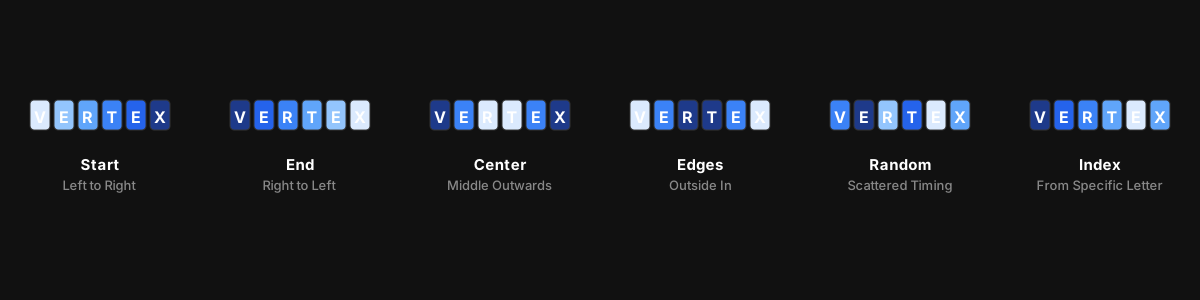
The stagger direction controls the order in which units enter the scene:
Start (left to right): Unit 0 begins its animation immediately; each subsequent unit begins slightly later. The result is a wave moving from the first character to the last — the most readable direction for languages written left to right.
End (right to left): The wave moves in reverse, from the last character to the first. Unusual and arresting. Creates a sense of text that fills from the end backward, like a thought that resolves before it begins.
Center outward: The middle character(s) move first, with units on either side following in sequence. The text appears to explode outward from its own center — a powerful, confident gesture.
Edges inward: The first and last characters move first; units converge toward the center. Creates a sense of gathering, compression, or convergence. Less common, which makes it memorable.
Random: Each unit gets a pseudo-random time offset, seeded for determinism (the same seed always produces the same "random" order). The result looks organic and non-mechanical — like the text is coalescing from chaos.
Index: A specific unit is designated as the focal point; the animation radiates outward from it. Most useful for interactive effects where a specific character is the point of interest.
The window parameter controls how spread out the timing is. A narrow window means units overlap heavily — they mostly arrive together with just a slight sequential quality. A wide window spreads the reveal across the full duration — you see one unit at a time, like counting them individually.
Easing at Two Levels
Kinetic typography systems apply easing at two distinct levels, and understanding both is essential.
Recipe-level easing applies to the overall animation progress — it shapes the entire animation's temporal arc. An ease-out applied at this level means the whole animation starts fast and decelerates.
Selector-level easing (distribution) applies to the stagger timing curve — it shapes how the wave of reveals accelerates across units. An ease-in distribution means the early units are packed close together (slow wave start) and the late units spread out (fast wave end).
These two easing layers are independent and combinable. A recipe with linear global easing but an ease-out distribution on the stagger produces a cascade that front-loads its energy — early characters appear slowly, then the rest arrive in a rush. The reverse produces the opposite feeling.
Text Grouping: Per-Line Independence
Most kinetic typography operates on a single body of text — one pool of characters moving through one stagger system. But complex multi-line text often wants each line to have its own independent animation arc.
Per-line grouping treats each line of text as a completely independent animation group. Each group has its own stagger wave that spans only its own characters. A five-line stanza with per-line grouping can have each line sweep in from left to right independently, creating a stacked waterfall of reveals that follows the natural reading order of the text.
This mode also enables the CursorAccessory to draw one caret per line — so a typewriter effect across a multi-line block shows individual cursors on each line simultaneously, which is the correct visual for a terminal or code editor aesthetic.
Visual Accessories: The Cursor
The cursor is the signature accessory of the typewriter effect. It is a thin vertical bar (caret style) or horizontal line (underline style) that draws at the leading edge of the reveal — the position just ahead of the most recently appeared character.
What makes the cursor a distinctively useful tool is its simplicity. In isolation, it is a rectangle. But placed at the boundary between visible and hidden text in a left-to-right stagger reveal, it transforms into a typewriter simulation that is immediately legible to any viewer who has ever seen a cursor blink on a screen.
The cursor's color, thickness (as a fraction of line height), and style are configurable. A thick underline cursor in a brand color creates a different impression than a thin white caret. Small details that make the effect feel authored rather than default.
3D Transforms in Kinetic Typography
One of the more underexplored capabilities in text animation is the third dimension. Most kinetic typography stays resolutely 2D — sliding in from left, scaling up from zero, fading from transparent. But all of these effects have 3D equivalents that add genuine visual depth.
A character that rotates on its Y-axis (flipping inward from a facing angle) with a perspective projection applied creates a card-flip entrance. A character that translates along the Z-axis (toward the viewer) while simultaneously scaling creates a depth-punch entrance. A line of text that arrives from below while rotating forward on the X-axis creates a perspective-fold entrance. You can explore 3D text effects directly using Vertex.art's 3D Text Generator or try the full animation pipeline in the live demo.
The Vertex.art animation engine supports full 3D transforms: translation in X, Y, and Z; rotation on all three axes with unbounded Euler angles (so a 720° spin plays through every degree, not just the shortest arc to the target); and anisotropic scale on all three axes. A CSS-style perspective distance value can be configured per animation to control the intensity of the foreshortening effect.
One important nuance: rotation in this system pivots around the bounding-box center of the animated unit. Combining a rotation with an offset translation (translating before rotating in the matrix composition) creates a pendulum swing effect, where the element swings from a pivot point offset from its center. This enables arcing entrance paths that are more interesting than straight slides.
Three Kinetic Typography Approaches for Different Brand Contexts
The Refined Reveal (Editorial and Luxury Brands)
For brands where the signal is restraint and craft — fashion, architecture, luxury goods, high-end hospitality — kinetic typography should whisper, not shout.
The refined reveal combines a character-level stagger (left-to-right, narrow window so units arrive close together) with a simple fade-in alpha effect and a very slight upward translate. The easing is ease-out: the animation starts briskly and settles gently. Duration is on the longer side — 1.2 to 1.8 seconds.
The effect reads as elegant and considered. Nothing overshoots. Nothing bounces. The text arrives the way a carefully set table looks — without calling attention to the effort.
The Energetic Cascade (Consumer and Entertainment Brands)
For brands where the signal is energy, personality, and fun — consumer apps, entertainment, sports, lifestyle — kinetic typography can be much more expressive.
The energetic cascade uses a character-level stagger with a center-outward direction (the text explodes from its own center), a scale-from-zero transform with a strong bounce easing (OutBounce or OutBack), and a simultaneous color transition from a neutral tone to the brand color. The window is medium — units overlap but are clearly sequential. Duration is shorter — 0.6 to 0.9 seconds.
The effect is impossible to ignore. It communicates urgency, confidence, and character. Used sparingly (for hero headlines and key moments), it is compelling. Used too often, it becomes fatiguing.
The Glitch Emergence (Tech, Gaming, and Disruption Brands)
For brands where the signal is disruption, technology, or raw digital energy — gaming, cybersecurity, fintech, web3 — kinetic typography can work with displacement and noise rather than clean transforms.
The glitch emergence applies a whole-layer or character-level entrance with a DisplaceEffect at high frequency (0.08 to 0.12) and moderate displacement amount. Combined with a slow ease-in global timing, the text appears to materialize from digital noise — coalescing from scatter into legibility. For a quick preview of the raw glitch aesthetic, Vertex.art's Glitch Effect tool shows you what displacement looks like on static imagery.
This approach works particularly well when the displacement is strongest at the very beginning (maximum chaos) and decays to zero by mid-animation (full clarity). The viewer's brain is drawn in by the incomprehensible scatter and rewarded by the resolution into readable text.
Practical Principles for Kinetic Typography
Match the timing to the reading speed. Text that animates faster than viewers can read is animation for its own sake. A stagger reveal should pace itself so that each unit is legible by the time the next one arrives. For body text at normal sizes, this is roughly 40–60ms per character.
Use the motion to direct the eye. A left-to-right stagger follows the natural reading direction — it is invisible guidance. A center-outward stagger pulls the eye to a focal point. Choose the direction that aligns with where you want attention to go.
Reserve your most complex effects for the most important moments. If every headline in a presentation uses an elaborate reveal, none of them feel special. A complex animation should mark a moment of significance — a product reveal, a key statement, a climactic moment.
Treat the exit as seriously as the entrance. Most designers spend all their attention on the entrance animation and use a simple fade for the exit. A well-crafted exit — perhaps the reverse of the entrance, or a related but contrasting direction — makes the animation feel complete.
Test on the fastest playback you can arrange. Animations that look gorgeous at 50% speed often look rushed at full speed. Play your animations at full speed on actual devices before finalizing duration and easing choices.
Conclusion
Typography animation is not a trend. It is a medium — a distinct mode of communicating with text that has been evolving since the first title sequence that made an audience feel something before the film began. Kinetic typography, at its best, is not something the viewer watches — it is something the viewer experiences.
The tools available today — per-character animation, six-mode stagger selectors, composable effect pipelines, full 3D transform support — make this medium accessible at a level that was genuinely out of reach even a few years ago.
What it still requires is the thing tools cannot provide: the judgment to know which typography animation serves the content and which is just noise. Motion that means something is always more powerful than motion that is merely impressive.
Vertex.art is built for designers who want both the capability and the control to make that judgment confidently.

The Best Motion Design App in 2026: A Complete Guide to Web Animation
What makes a great motion design app in 2026? This complete guide covers how motion design software works, what to look for, and how Vertex.art compares.

Text Animation: 7 Effects Every Designer Should Know in 2026
Master text animation in 2026. The 7 most effective text animation effects — typewriter, fade, bounce, motion blur, stagger, and more — explained with real examples.