
The Best Motion Design App in 2026: A Complete Guide to Web Animation
Motion design software used to be the exclusive territory of studios with After Effects licenses and teams of specialists. Today the best motion design apps put professional-grade animation in the hands of any brand, creator, or designer — and the barrier to entry has never been lower.
But what exactly is motion design? What should you look for in a motion design app in 2026? And how do you create animations that look polished and professional without a background in film or engineering? This guide answers all of it.
What Is Motion Design?
Motion design is the practice of bringing graphic elements to life through movement. It sits at the intersection of animation, graphic design, and visual storytelling — and it shows up everywhere: in brand intros, app interfaces, social media content, presentation decks, and product demos. Motion design software — from desktop applications to browser-based motion design apps — is the tooling that makes this possible at scale.
Unlike traditional animation, which tends to focus on characters and narrative, motion design is primarily concerned with communicating information and emotion through the movement of shapes, text, images, and UI elements. A word that slides onto screen carries more weight than one that simply appears. A logo that expands outward from a point feels confident and expansive. These are the outcomes motion designers spend their days crafting.
The field has exploded in recent years because digital surfaces now dominate how we experience brands and products. Static visuals compete with video for attention on every platform. Motion design gives static elements the quality of aliveness — and aliveness holds attention.
Why Motion Design Apps Matter More Than Ever in 2026
Several forces have converged to put motion design at the center of modern visual communication.
Kinetic typography is now a brand expectation. Headlines that build letter by letter, words that rotate through alternatives, text that responds to scroll — these are no longer premium touches reserved for big-budget productions. They are what audiences have come to expect from brands that take design seriously. Research from 2026 consistently shows that viewers retain 95% of a message delivered via motion versus roughly 10% when reading static text.
AI-generated content has made differentiation harder. As text and image content becomes increasingly commoditized, motion has emerged as a key signal of craft and intention. Animated design feels considered. It signals that someone — or some tool — made deliberate choices about how information should enter the viewer's experience.
Motion design apps have democratized the discipline. What once required months of After Effects training can now be accomplished in minutes with modern motion design software. Apps like Vertex.art bring professional-grade motion capabilities into a composable, real-time environment that works for designers at every level — no timeline editor, no scripting, no specialist required.
Search and AI systems reward motion-adjacent content. Pages that feature animation, video, and rich media consistently see higher engagement metrics — longer time-on-page, lower bounce rates — which signals quality to search engines and AI ranking systems alike.
The Building Blocks of Motion Design
Understanding motion design starts with understanding its core components. Every animation, no matter how simple or complex, is built from a combination of these elements.
Timing and Easing
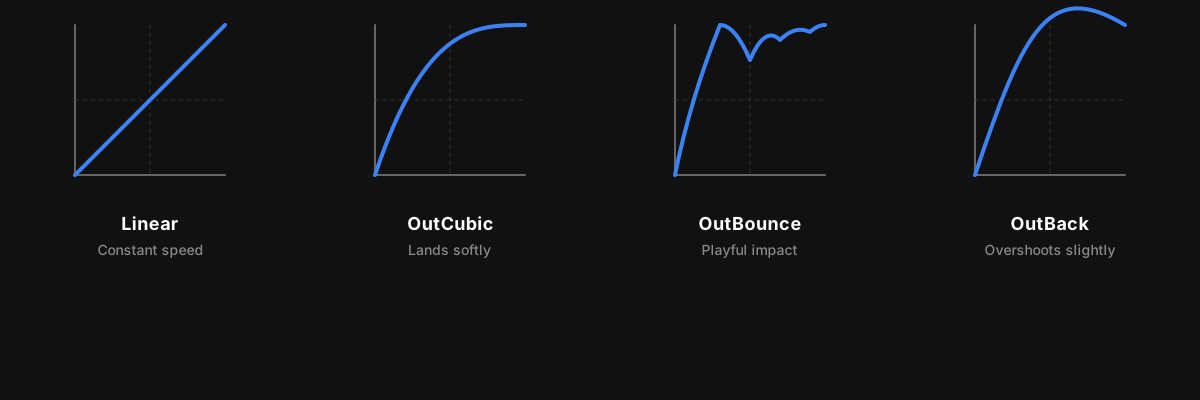
Timing is everything in motion. The same object moving the same distance can feel elegant or jarring depending on how it accelerates and decelerates. This is where easing comes in.
Easing curves describe how an animation speeds up or slows down over its duration. A linear ease moves at constant speed — mechanical and unnatural. An ease-out starts fast and decelerates — it feels like something landing. An ease-in starts slow and builds — it feels like something launching. More expressive curves like bounce, back (overshoot), and exponential each carry distinct emotional qualities.
Professional animation systems like the one powering Vertex.art include a full library of easing functions — quadratic, cubic, sinusoidal, exponential, bounce, and back — giving designers precise control over how movement feels.
Transform Effects
Transform is the foundation of most animations. It covers translation (moving an element in X, Y, or Z space), rotation (spinning on any axis), and scale (growing or shrinking). These three properties — often abbreviated TRS — can be combined and layered to produce everything from a simple fade-slide entrance to a full 3D perspective spin.
What separates sophisticated animation tools from basic ones is how transforms compose. In a well-designed system, rotation applied after translation produces different results than translation after rotation — enabling effects like a pendulum swing, where the pivot point is offset from the element's center. Vertex.art's animation engine handles this matrix composition correctly, giving designers access to the full mathematical richness of 3D transforms.
Opacity and Color
Alpha (opacity) is the simplest animation tool and also one of the most useful. A fade-in from zero to full opacity is the default entrance for good reason — it is clean, universal, and never distracting. Color interpolation adds another dimension, allowing elements to transition smoothly between hues as they animate.
Filters and Effects
Beyond the basics, advanced animation systems layer on visual effects: motion blur that trails behind fast-moving elements, displacement that scatters pixels across a noise field, and glass-morphism lenses that refract the content behind them. These effects, applied thoughtfully, elevate an animation from functional to cinematic.
How Animation Units Change Everything for Text
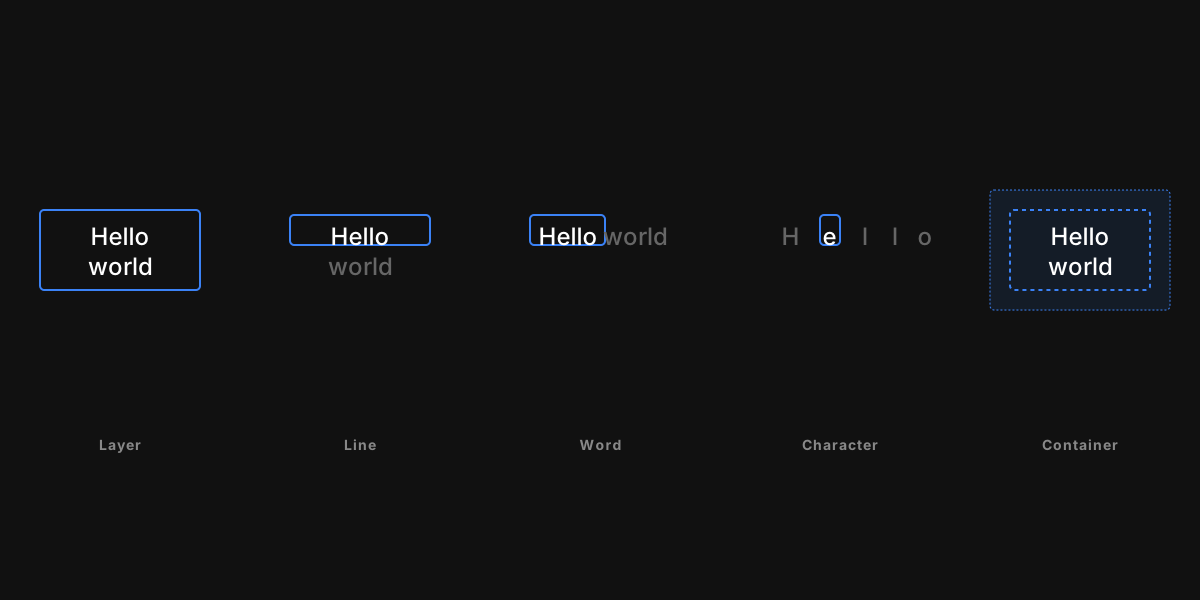
One of the most important — and underappreciated — concepts in motion design is animation granularity: what level of an element actually moves.
Most basic tools animate an entire layer as a single unit. The whole block of text slides in together, fades in together, or bounces in together. This works fine for simple cases, but it leaves an enormous range of effects off the table.
Professional motion design animates at the level of individual characters, words, or lines. When each character has its own independent timing, the text can ripple in from left to right, cascade from the center, or spring in with a randomized order that feels organic and alive.
This is what kinetic typography actually is at the technical level — text animated at sub-layer granularity, with stagger timing applied across units to create wave-like reveals.
Vertex.art supports five levels of animation granularity:
- Whole layer — the entire element animates as one
- Characters — each glyph animates independently
- Words — each word animates as a unit
- Lines — each line of text animates independently
- Container members — each child element within a frame or group animates individually
This granularity system means the same animation recipe applied at the character level versus the word level produces an entirely different emotional result — without changing a single parameter.
Stagger: The Secret to Professional-Looking Animations
If there is one technique that separates amateur motion design from professional work, it is staggering.
Stagger means that each animated unit starts its animation at a slightly different time, creating a wave or cascade effect rather than everything moving simultaneously. A simple scale entrance applied to individual characters without stagger produces an instantaneous flash. The same entrance with a left-to-right stagger produces a smooth reveal that guides the eye naturally from start to finish.
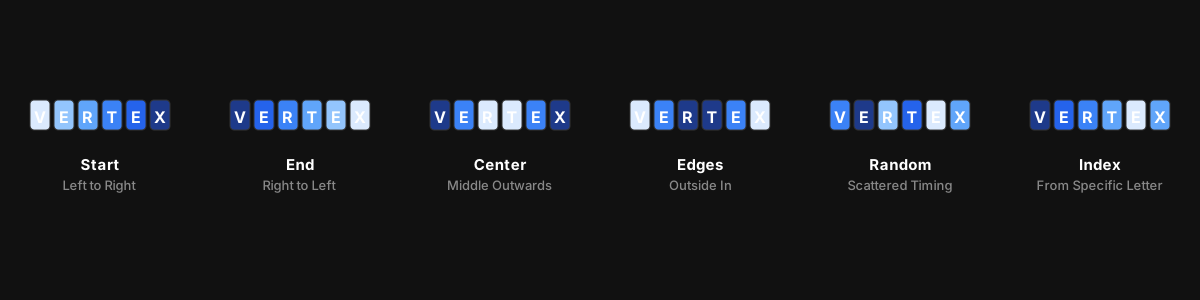
Professional stagger systems go well beyond simple left-to-right timing. Vertex.art supports six stagger modes:
- Start — wave originates from the first unit
- End — wave originates from the last unit
- Center — wave radiates outward from the middle
- Edges — reveals from both ends toward the center
- Random — pseudo-random order (deterministic, so it looks the same every time)
- Index — focuses on a specific unit and ripples outward
Each of these, combined with different easing curves on the per-unit timing, produces a distinct character. A center-outward stagger with a bounce ease creates an explosive, celebratory feel. An edges-to-center stagger with an ease-out creates the sensation of text being gathered together.
Masks and Reveal Effects
Another powerful category of motion design tools is masking — controlling where and how an element becomes visible as it animates in.
A linear reveal mask sweeps across an element in a cardinal direction (left to right, top to bottom, and so on), progressively uncovering it like a curtain opening. A radial reveal mask expands outward from a center point, like a spotlight turning on. These masks are invisible — they do not add visual elements, they simply control the visibility boundary of what is already there.
Combined with stagger and transform effects, reveal masks enable the clean typewriter-style animations and spotlight-reveal text effects that dominate high-end brand content.
What to Look for in a Motion Design App
Not all motion design software is built the same. Here is what separates a professional-grade motion design app from a basic animation tool.
Composable effects. The best motion design apps let you layer effects — transform, opacity, color, blur, displacement — in sequence, with each effect building on the last. Vertex.art's pipeline works this way: every effect is a discrete, stackable component that you can reorder and combine without rewriting parameters.
Text animation granularity. A motion design app that can only animate entire text blocks as single units is severely limited. The difference between animating at the layer level versus the character level is the difference between "text slides in" and "text performs."
Easing variety. Twelve or more easing curves — covering quadratic, cubic, sinusoidal, exponential, bounce, and back — give a motion design app the full vocabulary it needs to match any emotional register.
Real-time feedback. Professional motion design software renders changes instantly. Waiting seconds to preview a single parameter adjustment is a workflow killer.
No-code accessibility. The best motion design apps in 2026 do not require scripting or timeline expertise. Vertex.art is built specifically for designers, not engineers.
Key animation capabilities in Vertex.art's motion design app include:
- Full 3D transform animations with configurable perspective
- Per-character, per-word, and per-line text animation
- Six stagger reveal modes with customizable easing
- Motion blur, displacement, and LiquidGlass filter effects
- Linear and radial reveal masks
- Typewriter cursor accessories with caret and underline styles
- 12 easing curves from linear to bounce and exponential
- Loop, ping-pong, and single-play timing modes
Whether you are creating a social media caption that springs to life, a presentation headline that builds character by character, or a brand logo reveal that feels like a cinematic moment, the tools are there and ready.
Motion Design App vs. Motion Design Software: Is There a Difference?
Technically no — "motion design app" and "motion design software" refer to the same category of tool. The distinction that matters is between desktop-installed software (traditionally After Effects, Cinema 4D) and browser-based or native motion design apps that require no installation.
Browser-based and native motion design apps have significant advantages in 2026: they are always up to date, accessible from any device, easier to share, and typically faster to onboard new users. Vertex.art falls into this category — a purpose-built motion design app that does not require you to install, license, or maintain a heavy desktop suite.
Common Motion Design Mistakes to Avoid
Even with great tools, a few recurring pitfalls can undermine otherwise well-crafted animations.
Animating everything at once. When all elements on screen enter simultaneously, nothing stands out. Stagger your entrances and give each element its moment.
Using linear easing for everything. Linear motion looks robotic. Default to ease-out for entrances (things settle into place), ease-in for exits (things accelerate away), and ease-in-out for looping or continuous motion.
Over-animating. More effects is not better. A single well-timed fade-slide entrance is more effective than a pile of simultaneous bounces, spins, and color changes. Let the motion serve the content.
Ignoring timing. An animation that is 0.2 seconds too slow feels ponderous. One that is 0.2 seconds too fast feels frantic. Test your durations and lean toward shorter rather than longer.
Forgetting mobile. Verify that your animations read clearly at smaller sizes and on lower-powered devices. Complex displacement effects that look stunning on a desktop monitor can become illegible or janky on mobile.
Conclusion
Motion design is no longer a specialist discipline — it is a core fluency for anyone who communicates visually. The best motion design apps have made the technical barriers manageable, motion design software has matured rapidly, and audiences now expect the kind of alive, expressive content that only animation can deliver.
The principles remain timeless: use timing with intention, choose easing that matches the emotional register you want, animate at the right granularity for the effect you need, and always serve the content rather than the spectacle.
Vertex.art is a motion design app built for designers, not engineers — composable, real-time, and powerful enough for the full range of professional motion work. Explore the animation system and see what your content looks like in motion.

Text Animation: 7 Effects Every Designer Should Know in 2026
Master text animation in 2026. The 7 most effective text animation effects — typewriter, fade, bounce, motion blur, stagger, and more — explained with real examples.

Typography Animation and Kinetic Typography: How Per-Character Text Animation Transforms Brand Storytelling
What is typography animation and kinetic typography? How does per-character text animation work? A complete guide to animated typography with examples from Vertex.art.